Shadow AI: 6 Signs Your Teams Already Use Unapproved AI Tools
By Delos Intelligence — 2026-10-29
Unapproved AI use is often a signal of unmet needs, not bad intent. Spot six signs and bring teams back into a safer, workable framework.
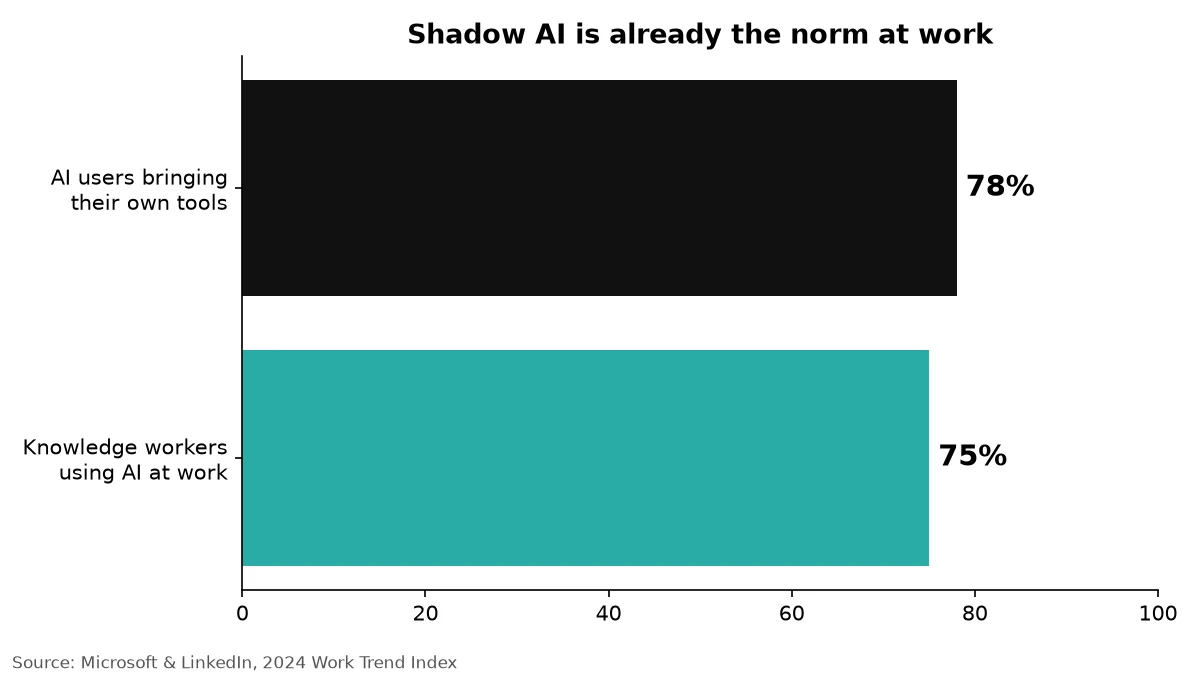
AI use has already crossed the office threshold. The Microsoft and LinkedIn 2024 Work Trend Index found that 75% of knowledge workers use generative AI at work. Among those users, 78% bring their own AI tools to work (BYOAI). That is shadow AI: tools in the workflow that the organization has not reviewed or approved.
It is rarely malice. People want to answer a customer sooner, summarize a long file, or get through a backlog. A ban does not remove that demand; it makes the use harder to see. Visibility is the first step toward a safer alternative.
Why shadow AI matters
A pasted customer record, contract, or source-code snippet can leave your organization's perimeter when it enters a consumer chatbot. Depending on the provider's settings and agreement, inputs may be retained or used in ways your team did not authorize. That can conflict with GDPR obligations, client contracts, confidentiality terms, or internal handling rules. It also leaves security and compliance teams without a reliable audit trail: who uploaded what, where, and when?
The risk is not limited to prompts. An extension can read browser content; an AI app connected through OAuth might receive access to documents or email. Your control depends on each product's permissions and configuration. The OWASP security community offers useful starting points for assessing application risks, but an inventory of your own tools comes first.
Six signs your teams already use unapproved AI
1. Unexplained traffic to AI domains
Proxy, DNS, and SSO logs may show recurring connections to chatbot, transcription, image, or coding-assistant services that are absent from your approved-tool register. Look for patterns rather than treating a single visit as proof. Separate research on a vendor's website from authenticated use and avoid indiscriminate surveillance.
2. Browser extensions and OAuth grants
A browser extension marketed as an AI writing helper can request access to pages people open. A “Sign in with Google” click can grant an external app access to identity or workspace data. Review extension inventories and OAuth consent logs for high-privilege grants; revoke only after checking the business need and impact.
3. Documents with a suddenly uniform voice
Text that becomes unusually polished, repetitive, or uniform, with odd phrasing or invented references, can prompt a conversation about workflow. It is not a reliable AI detector and should never be used alone to accuse an employee. Ask how the document was produced and verify sources where accuracy matters.
4. Small AI subscriptions on expense reports
Personal or team cards may show modest monthly charges for writing, meeting, research, or developer assistants. Compare these with the procurement register and ask what job each purchase solves. An expense line is an opportunity to discover a need, not a reason for a witch hunt.
5. A sudden leap in output with no tooling change
A team delivers drafts or reports much faster, yet nobody can explain the changed workflow or review process. Faster delivery is welcome; undocumented steps are the issue. A short, non-punitive process review can reveal both a useful practice and where sensitive information crosses a boundary.
6. Nobody knows which tools touch customer data
Ask a simple question across IT, legal, and business teams: “Which AI tools touch customer data?” If no one can name the tools, owners, and access scopes, that gap is the clearest sign of shadow AI. Start a living inventory, including free accounts that never appear on a purchase order. For the related access problem, see our least-privilege guide for AI agents.
What not to do
A blanket ban and a witch hunt make usage less visible. People may move to personal accounts or phones, beyond corporate logs, while the underlying need remains. Do not treat every AI-assisted sentence as misconduct. Set clear boundaries for sensitive data, explain why they exist, and invite people to disclose tools without fear of automatic punishment.
A five-step plan to govern shadow AI
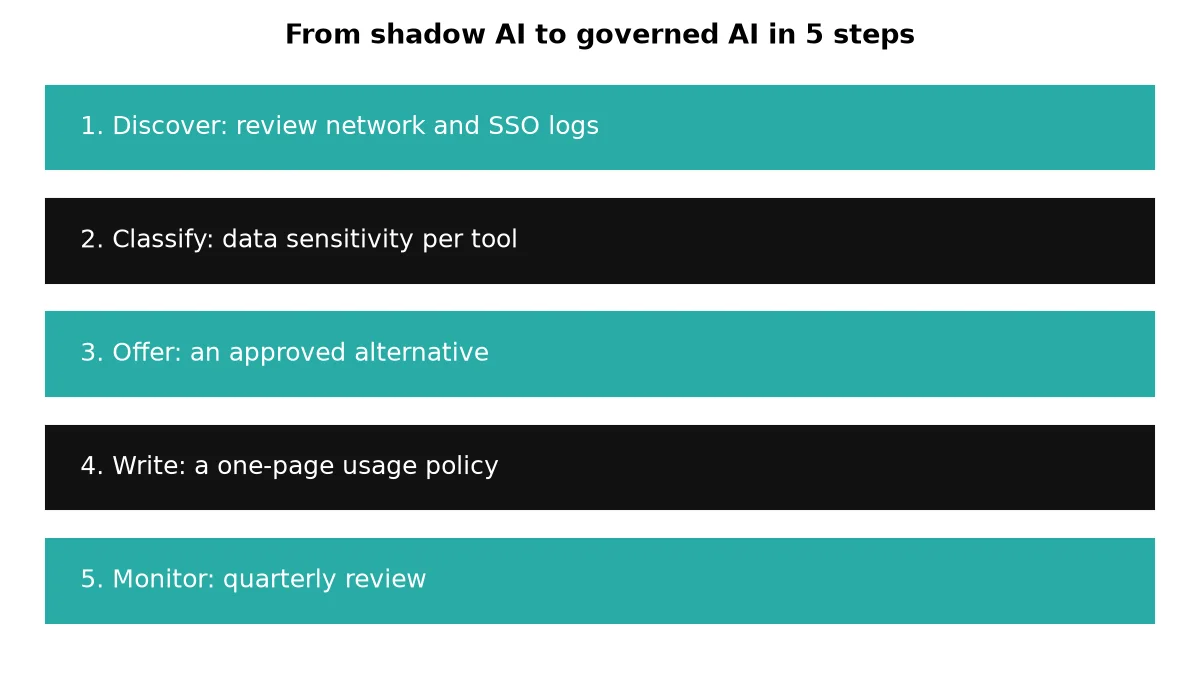
1. Discover actual use
Review network and SSO logs with appropriate privacy safeguards. Run a five-question anonymous survey: which tools, for what tasks, what data, what benefits, and what stops people using approved options? Combine the signals into an inventory with a named owner for each tool. Do not mistake a domain visit for proof of data transfer.
2. Classify data and tools
Mark the data each tool can reach as public, internal, confidential, or regulated. Record whether the product stores prompts, offers retention controls, supports enterprise identity, and permits exports or onward sharing. Prioritize tools handling client files or personal data, not merely those with the highest visit counts.
3. Offer an approved alternative that is just as convenient
If the sanctioned option is slower, harder to access, or less useful than a personal subscription, people will keep finding workarounds. Pilot an enterprise-approved tool on the workflows you discovered; give teams a quick path to access and support. This is the step that actually reduces shadow AI, not the announcement of a prohibition.
4. Write a one-page usage policy
Say what must never be pasted into an unapproved tool, which use cases are allowed, how a new tool is evaluated, and who can approve it. Include a channel for reporting mistakes without delay. Link the policy to real examples and a short approval turnaround rather than an unreadable document.
5. Monitor and adjust quarterly
Reconcile the tool inventory with SSO, network, and procurement data every quarter; review permissions, incidents, and user feedback. The NIST AI Risk Management Framework offers the useful cycle Govern, Map, Measure, Manage. Use it to assign ownership, map use cases, measure risks, and act on findings. Our shadow AI governance playbook
A concrete example (illustrative)
Imagine a 200-person services firm. A review of SSO logs finds 14 AI apps in use. Interviews and permission checks show that three touch client documents. Instead of blocking everything overnight, the firm approves one enterprise tool with a contractual data-retention guarantee, migrates the relevant workflows, and retires the other two within a month. These numbers describe an illustrative scenario, not a real customer result or measured benchmark.
Where AI workers fit
A governed AI worker can give teams the speed they were seeking while keeping its access scoped to a task and its actions logged. A worker drafting from approved documents, for example, need not have permission to read every file or send messages without review. Keep a named owner, human approval for consequential actions, and an audit trail. See our guide to AI agent accountability for the governance around that owner.
Conclusion
Shadow AI is a visibility and usability problem before it becomes an enforcement problem. Find the tools, protect the data that matters, and replace risky shortcuts with approved workflows people actually want to use. Discover Workers Delos to explore AI workers that can fit into a governed workflow.