Meeting Follow-Ups on Autopilot: What Is Worth Automating (and What Is Not)
By Delos team — 2026-11-21
Most meetings do not fail in the room. They fail in the 48 hours after, when nobody sends the recap, the action items live in someone's notebook and the next meeting starts with "where did we land on this?". Harvard Business Review's research on meeting overload found that [71% of senior managers consider meetings unproductive and inefficient](https://hbr.org/2017/07/stop-the-meeting-madness). Part of that waste is the follow-up work. The good news: much of it is mechanical, and AI handles mechanical work well. The catch: not all of it should be automated. Here is where to draw the line.
Most meetings do not fail in the room. They fail in the 48 hours after, when nobody sends the recap, the action items live in someone's notebook and the next meeting starts with "where did we land on this?". Harvard Business Review's research on meeting overload found that 71% of senior managers consider meetings unproductive and inefficient. Part of that waste is the follow-up work. The good news: much of it is mechanical, and AI handles mechanical work well. The catch: not all of it should be automated. Here is where to draw the line.
Why the follow-up is the weak link
A meeting produces three things: decisions, actions and context. The decision is only worth something if it is written down, the action only happens if someone owns it with a date, and the context only helps if people who were absent can find it. In practice, the person with the least time (the organiser) writes the recap last, from memory. Quality varies, delays pile up, and the same topics come back. Microsoft's Work Trend Index keeps pointing to the same pattern: knowledge workers are buried in meetings and communication, with too little time left for focused work.
What is worth automating
Automate what is factual, repetitive and easy to verify in 30 seconds.
1. The factual summary
Who attended, what was discussed, in five to ten lines. A transcript-based summary is faster and more consistent than notes written from memory.
2. The decision log
"We decided X" is the most valuable line of any meeting. An agent can extract decisions as a separate list, so they stop being buried in a paragraph.
3. Actions, owners and due dates
This is the biggest win. The agent proposes a list of actions with a named owner and a date, and flags every action that has no owner. A missing owner is the most common reason an action never happens.
4. The draft of the follow-up email
A first draft in your tone, ready to review, sent to attendees and absentees. You edit two sentences instead of writing from scratch.
5. Task creation and reminders
Once actions are approved, create them in your tracker and remind owners when a deadline slips. For teams already using an assistant such as the ones described in our guide on AI meeting intelligence, this is where the time saving becomes visible.
!Meeting follow-ups: what to automate, what to keep human
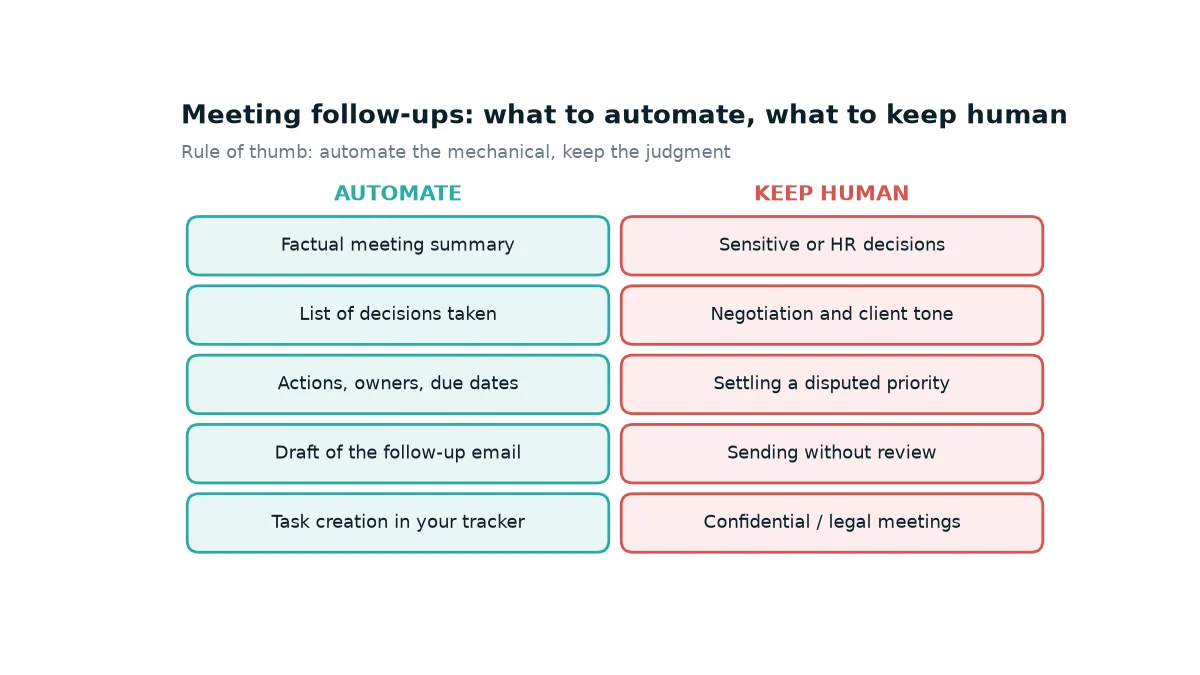
Meeting follow-ups: what to automate, what to keep human
What you should not automate
Automation is a bad idea when the cost of a wrong sentence is high or when tone is the point.
- Sensitive and HR meetings. Performance reviews, disciplinary topics and anything confidential should not go through an automatic recap. Keep recording off and write the notes yourself.
- Negotiations and client tone. An agent can draft, but a human decides how firm or warm a message to a client sounds.
- Contested priorities. If two leaders disagree on a priority, a neutral-sounding summary can hide the disagreement or take sides by accident. A person must settle it.
- Sending without review. The single most common failure of "autopilot" follow-ups is an email that goes out with a wrong owner or a misread decision. The review step costs one minute and prevents an awkward correction.
- Legal and regulated discussions. Recording and processing rules apply. Consent for recording and personal data handling are covered by data-protection law; the European Commission's data protection pages are a good starting point, and your legal team should set the policy.
A reliable 5-step flow
The flow that works in practice has five steps, with one human checkpoint in the middle.
!A reliable 5-step follow-up flow
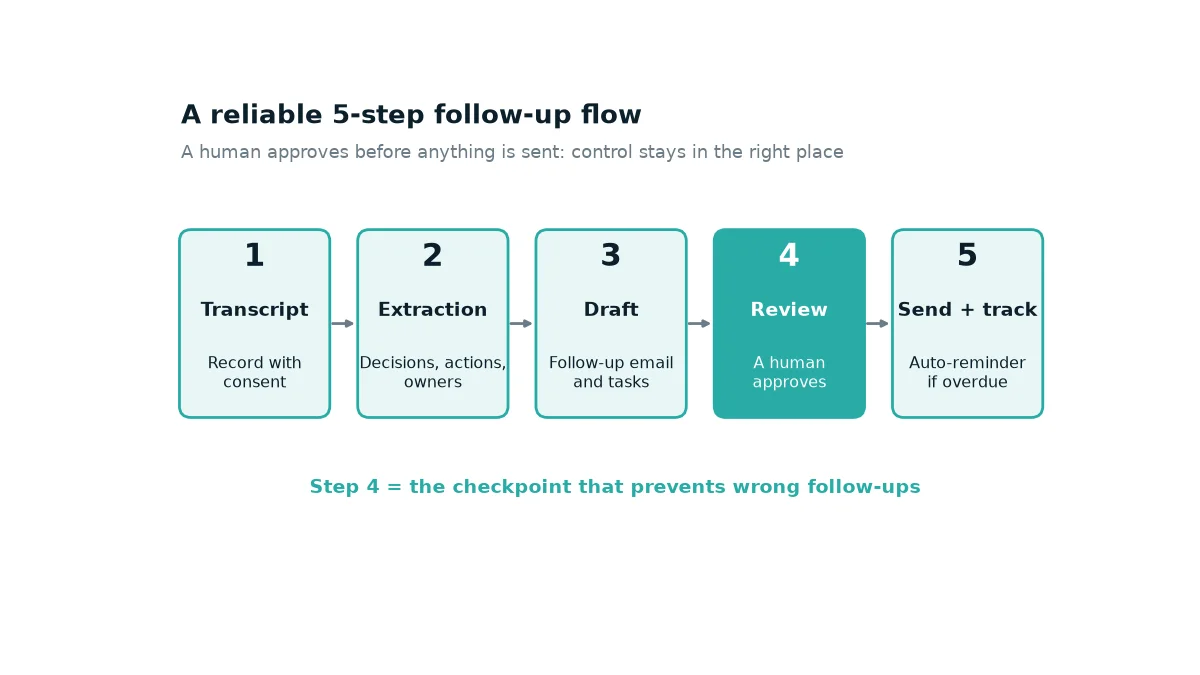
A reliable 5-step follow-up flow
1. Transcribe with the explicit consent of attendees.
2. Extract decisions, actions and owners.
3. Draft the follow-up email and the tasks.
4. Review: a human approves, in under two minutes.
5. Send and track: the agent sends, creates tasks and reminds owners if a due date passes.
A single agent is enough for this flow. As we explain in our decision guide on single vs multi-agent architecture, start simple and add agents only when a constraint forces you to.
Three concrete examples
Weekly sales pipeline review. The agent extracts each deal's next step and owner, writes them to the CRM and sends a recap to the sales team. The manager reviews a list instead of rewriting notes.
Project steering committee. The agent produces the decision log and flags risks that were raised but not assigned. The project lead checks the owners before sending.
Customer onboarding call. The agent drafts a recap with agreed milestones and sends it for approval by the account manager, so the customer gets it the same day.
A 2-week rollout
Week 1. Pick one recurring meeting (the weekly team meeting is ideal). Run the flow in draft mode only: the agent produces the summary and actions, you compare them with your own notes. Measure two things: how many actions were missed, and how long review takes.
Week 2. Switch on sending after review, and task creation in your tracker. Write down the meeting types excluded from automation, and share the rule with your team. Pair it with a simple internal policy; our guide to an acceptable use policy for AI gives a one-page template.
Conclusion
Automate the mechanical parts of the follow-up (summary, decisions, actions, draft, tasks) and keep humans on the judgment parts (sensitive topics, tone, priorities, final send). One human checkpoint is the difference between a time saver and a source of embarrassing emails. Start with one meeting, measure, then extend.
FAQ
Can AI send the follow-up email on its own?
It can, technically, but for most teams the right default is a draft that a person approves in under two minutes. Move to automatic sending only for low-risk internal meetings, after weeks of clean drafts.
Do I need everyone's consent to record?
Rules depend on your country and your company policy. Tell attendees at the start, get explicit consent and ask your legal team to confirm the rules. When in doubt, do not record.
How do I measure the benefit?
Compare, on one recurring meeting, the time to send the recap, the number of actions with an owner and a date, and the number of actions done by the deadline, before and after. Use your own figures rather than generic claims.