From Inbox to Done: 7 Workflows Enterprises Automated With AI Agents in 2026
By Delos Intelligence — 2026-10-14
AI agents are quietly taking over the repetitive work that eats enterprise time. Here are seven workflows companies automated in 2026, the results they got, and how to start.
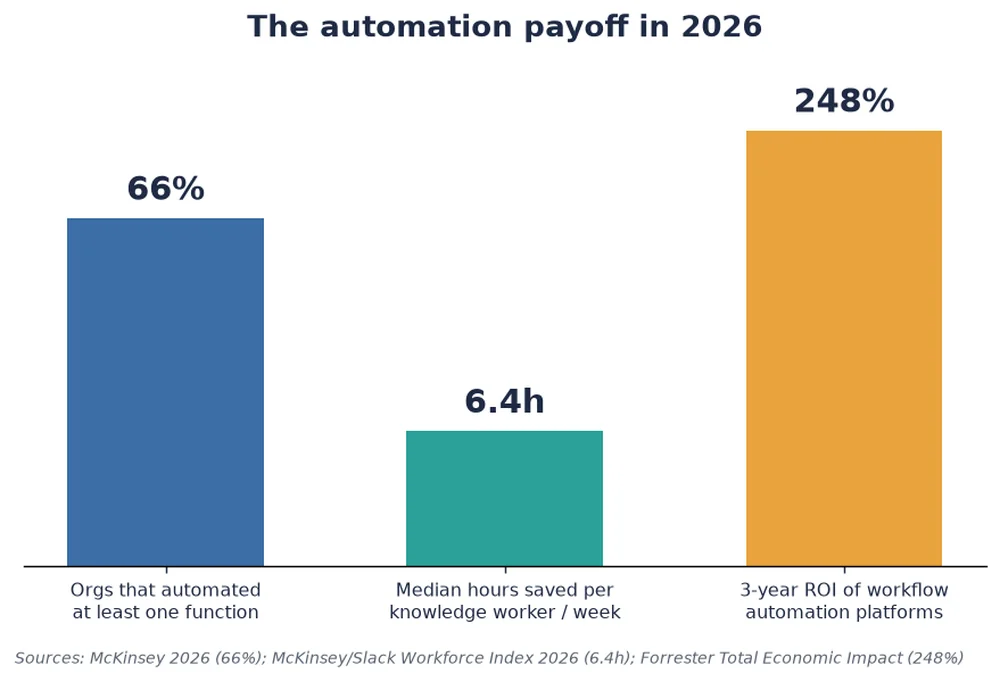
Most enterprise work is not glamorous. It is moving a figure from one system to another, drafting the same reply for the hundredth time, chasing an approval, reconciling two spreadsheets that should already agree. In 2026, AI agents, software that can read context, decide a next step and act across tools, are quietly absorbing exactly this kind of work. According to McKinsey, 66% of organizations have now automated at least one business function with AI, and the median knowledge worker reclaims 6.4 hours a week once agents handle the repetitive layer.
This is not about replacing teams. It is about moving people off the drudge work and onto the parts of the job that actually need judgment. Below are seven workflows enterprises automated this year, what changed, and how to pick your own first target.
The seven workflows that paid off fastest
When we look at where agents landed first, a clear pattern emerges: high-volume, rule-bound tasks with a clear definition of done. These are the places where an agent can run for hours without a human in the loop and still be trusted.
1. Inbox and ticket triage
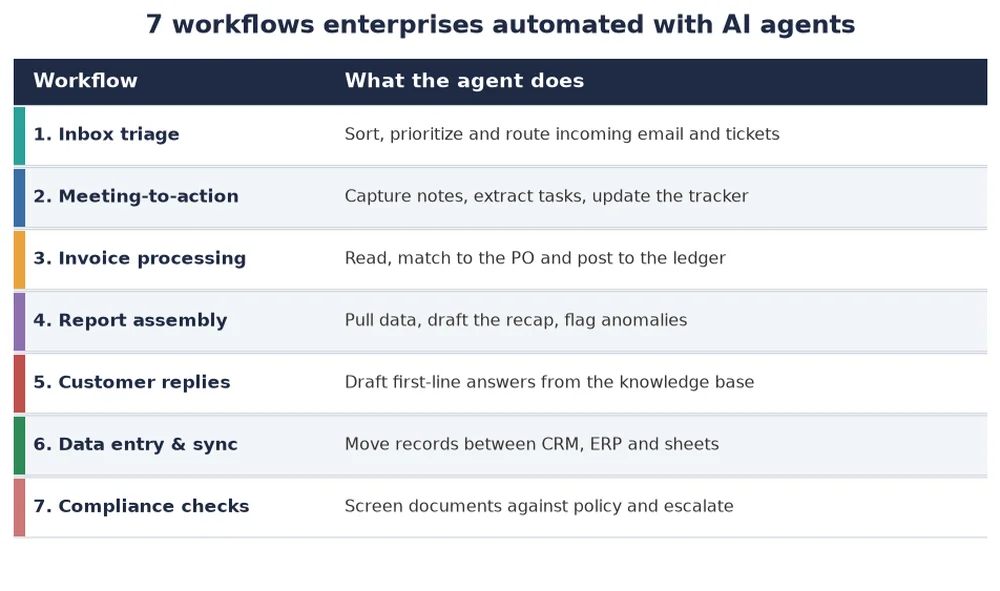
A shared mailbox or helpdesk queue is a classic bottleneck. An agent reads each incoming message, classifies it, assigns priority, routes it to the right owner and drafts a first-line reply. Teams report first-response times dropping from hours to minutes, with humans stepping in only on the exceptions the agent flags.
2. Meeting-to-action
The gap between a meeting ending and the follow-ups happening is where work dies. Agents now transcribe the call, extract decisions and action items, and write them straight into the project tracker, assigned and dated, before anyone has left the room.
3. Invoice processing
Accounts payable is a textbook agent use case: read the invoice, extract the line items, match them to the purchase order, flag the mismatches and post the clean ones to the ledger. The repetitive 80% runs unattended; the finance team only sees the 20% that needs a human eye.
4. Report assembly
Weekly and monthly reports eat analyst time that should go to analysis. An agent pulls the numbers from each source, drafts the narrative recap, highlights anomalies and hands a near-final draft to the human for a sanity check instead of a rebuild.
5. Customer replies
For first-line support, agents draft answers grounded in the knowledge base and past tickets, so a human agent edits and sends rather than writing from scratch. CSAT holds because the human stays in control of tone and the hard cases. Read about coordinating multi-agent systems while keeping a human in control.
6. Data entry and synchronization
Records that must live in the CRM, the ERP and a finance sheet at once are a perennial source of silent errors. An agent keeps them in sync, moving and reconciling records between systems and surfacing conflicts instead of quietly overwriting them.
7. Compliance checks
Agents screen contracts, expense claims and documents against policy, approve the clear cases and escalate the rest with a reason attached. The audit trail is cleaner than a manual process because every decision is logged, which matters when you need clear accountability. See our guide to clear accountability for autonomous agents.
Why these win and others do not
The successful automations share three traits: the task is high-volume, the rules are explicit enough to encode, and there is a clear definition of done the agent can check itself against. Gartner expects that by 2028, agentic AI will be embedded in 33% of enterprise software applications, up from less than 1% in 2024, and that agents will autonomously handle 15% of day-to-day work decisions. Deloitte projects that a quarter of companies using generative AI will run agentic pilots in 2025, rising to half by 2027.
The payoff is real but not automatic. Forrester's Total Economic Impact analysis of workflow automation platforms points to a 248% three-year ROI, yet the same research is blunt that value comes from redesigning the workflow, not bolting an agent onto a broken one.
How to pick your first workflow
Do not start with your most complex process. Start with the one that is painful, repetitive and measurable. Three questions make the choice easy:
- Volume: does this happen dozens or hundreds of times a week?
- Clarity: can you write the rules a new hire would follow?
- Checkable: is there an obvious signal that the task was done right?
If the answer to all three is yes, you have a candidate. Keep a human on the exceptions, measure the before-and-after, and expand only once the first agent has earned trust. The companies seeing the 6.4 hours back did not automate everything at once; they automated one boring thing well, then the next.
The lesson of 2026 is unglamorous and that is the point. The biggest productivity gains are not coming from a flashy new model. They are coming from pointing capable agents at the repetitive work that never should have needed a human in the first place, and letting your people go do the work that does.