Why 9 in 10 AI Pilots Never Reach Production (and 5 Gates That Fix It)
By Delos Workers team — 2026-10-31
Most AI pilots never change a live workflow. Five practical gates help teams prove value and move safely from demo to production.
Count your active AI pilots. Now name one workflow that runs differently because of them. In many companies, the first number is 15 or 30 and the second is zero. That gap has a name: pilot purgatory. Teams keep funding promising demonstrations, while finance still reconciles invoices by hand, HR still copies onboarding data between tools, and support still forwards tickets manually. The issue is the distance between a demo and a dependable process.
The numbers behind pilot purgatory
MIT NANDA's The GenAI Divide: State of AI in Business 2025 reports that roughly 95% of enterprise generative AI initiatives in its research show no measurable return on the bottom line. This measures business impact, not model capability. Meanwhile, McKinsey's State of AI 2025 finds that 88% of organizations use AI in at least one business function, yet only about 6% are AI high performers attributing more than 5% of EBIT to AI. Usage has spread much faster than measurable transformation.
Other analyses published in 2026 place the share of pilots that never reach production around 86–88%. Definitions vary; intentional stops, failure and ROI are not interchangeable. Read the figures as an order of magnitude, not a law. What blocks experiments from becoming everyday work?
!The pilot-to-production gap: 95% show no measurable return, 88% use AI, and 6% are high performers
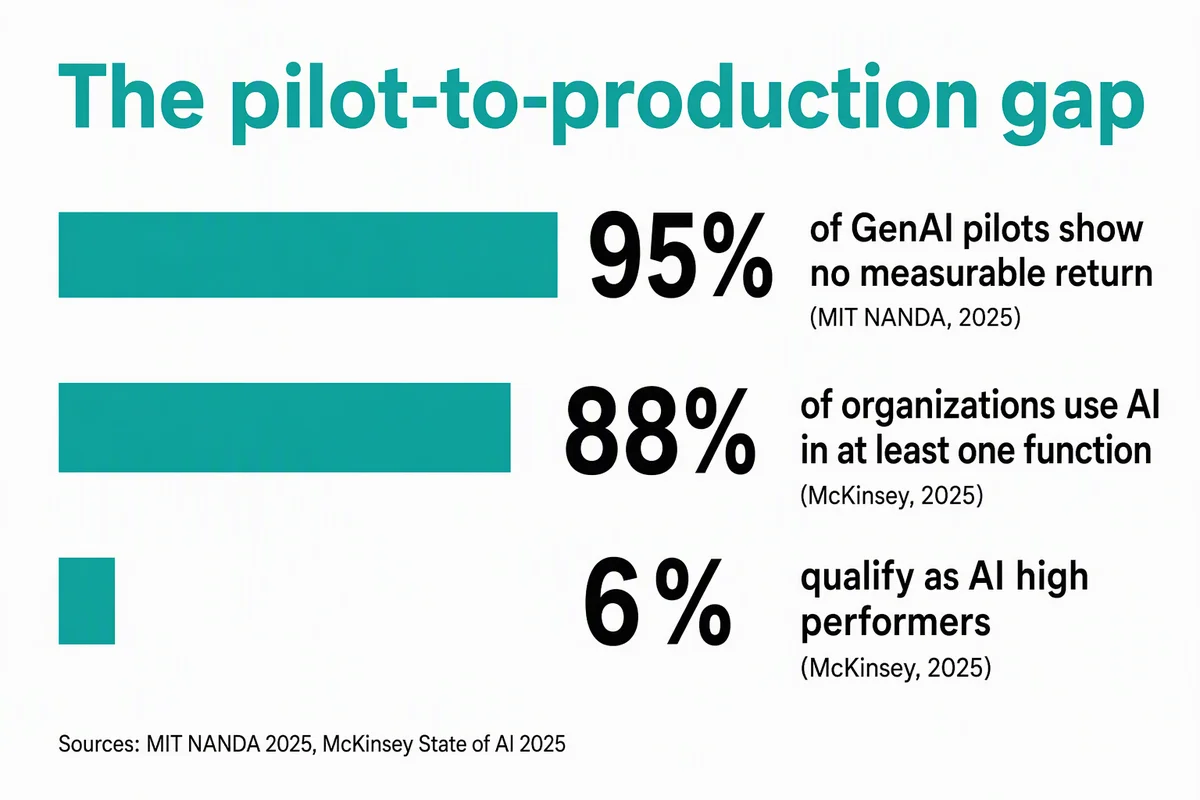
The pilot-to-production gap. Sources: MIT NANDA (2025) and McKinsey (2025); the measures describe different populations and outcomes.
The model is rarely the problem
A pilot asks whether a model can summarize a case, classify an email or draft an answer. Production asks whether the whole workflow can perform reliably on Tuesday morning when the data is incomplete, the CRM is slow and a customer disputes the result. A support demo answers curated questions; production must detect outdated policies, respect permissions and escalate risky refunds.
Teams often check data readiness, access controls, logging and rollback only after the demo works. That reverses the hard part. Gartner predicts that 60% of AI projects lacking AI-ready data will be abandoned through 2026. Even a strong model cannot reconcile conflicting supplier records or retrieve a contract it is not allowed to see.
Three failure modes
- Context gaps. The agent cannot access the same documents and systems as the human doing the job. An HR onboarding assistant knows the policy PDF but not the employee's start date, country or approved equipment budget. Its answers sound plausible while missing the decision-critical facts.
- Integration fragility. A demo built on exported spreadsheets breaks against live systems. A finance pilot matches 50 static invoices, then meets new tax codes, revised purchase orders and API timeouts. Without validation, retries and a queue for exceptions, it cannot safely close the books.
- Governance breakdown. Nobody owns approval, logging or incidents. If a support agent sends an incorrect reply, who can see the source it relied on, correct the record and pause the workflow? A handoff document is not enough unless a team actually runs it.
5 gates to clear before you launch a pilot
Answer these questions before buying tools. If a gate cannot be cleared, narrow the scope or change workflows.
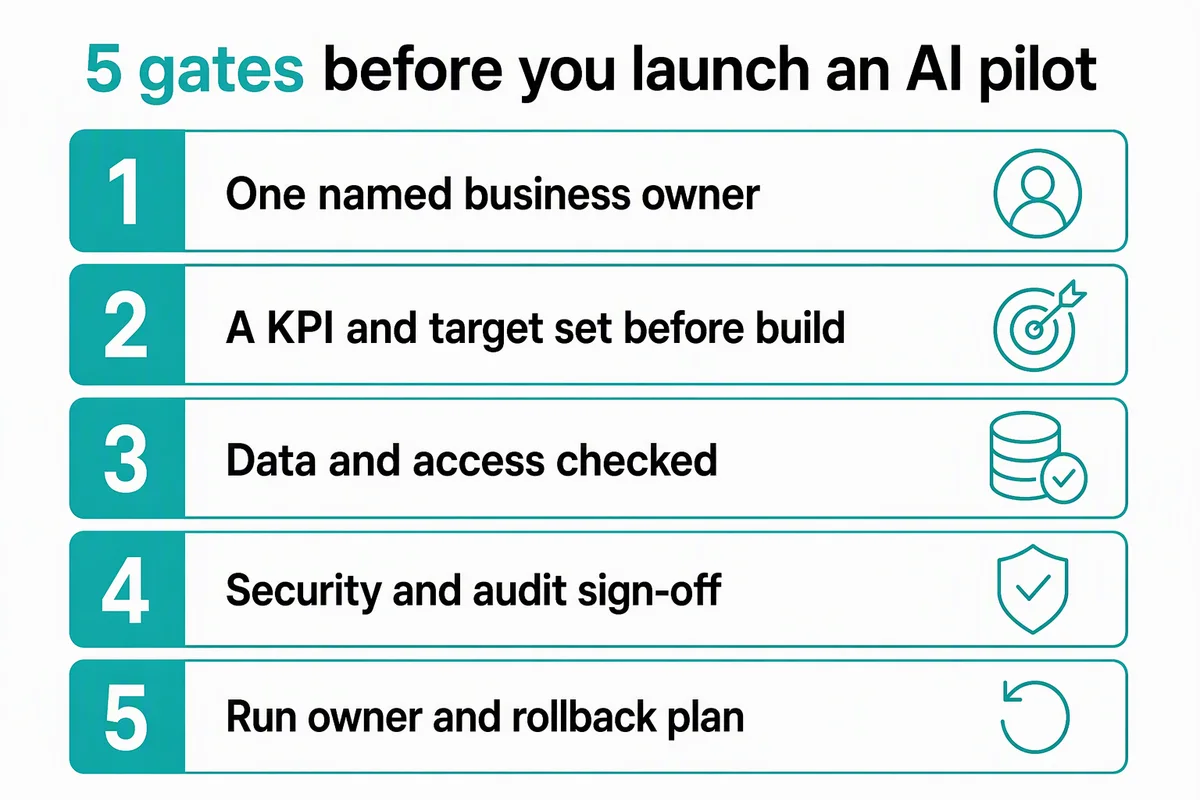
5 gates before you launch an AI pilot.
1. One named business owner
A pilot sponsored by IT alone often ends when the experimentation budget does. Name the manager whose process will change and who will be measured on that change. For invoice handling, that might be the accounts payable lead—not the person who picked the model. Ask them to define human exceptions, approve the procedure and review feedback. A committee cannot replace one accountable owner.
2. A KPI and a target before you build
Record a baseline and a target: minutes per invoice, weekly hours spent triaging HR requests, first-response time in support, or the proportion of cases resolved without rework. Include quality and risk alongside speed. For example, reducing first-response time from eight hours to two is not a win if escalations double. Without a baseline, you cannot prove ROI; that kills pilots in budget review.
3. Data and access checked
List every system and document the pilot needs, the owner of each source, and who is entitled to see it. Test with real permission levels in week one, not week ten. A payroll assistant must not expose one employee's salary to another; a support assistant must not read another customer's account. Check freshness and role changes. Fix unreliable sources or narrow the scope.
4. Security and audit sign-off
Bring security and legal reviewers in early. Agree on logging, retention, data residency, service accounts and human approval for sensitive actions such as payment release, hiring decisions or customer refunds. Keep a trace from input to proposed action to final approver. For related risks, see our guide to spotting unapproved AI tools and shadow AI signals. Get approval before launch day.
5. A run owner and a rollback plan
Who handles incidents on day 90? Who can switch the agent off, route work back to people and replay failed cases? Reserve engineering capacity for monitoring, connector changes and evaluation after launch. Alert on errors, latency, cost and unusual actions; rehearse an ERP outage. Budget for maintenance.
A 30-day pilot built to scale
Week 1 — scope and prerequisites. Name the business owner, measure the baseline, select one workflow, and review data, permissions and security. Sample normal and disputed finance cases and HR requests from different countries. Set stop conditions.
Week 2 — build on the real path. Connect to the live systems through approved interfaces, not one-off exports. Keep the first use case narrow: support ticket classification before autonomous customer replies, for instance. Test missing data and integration failures.
Week 3 — supervised operation. Run alongside the existing team. Require human approval for consequential actions and log every proposed action, source and decision. Compare human and agent outcomes and investigate disagreements.
Week 4 — decide. Compare the KPI with the baseline and check quality, cost and incident volume. Scale if results improve; fix a specific failure or stop if the operating cost outweighs the benefit. A killed pilot with a clear reason is cheaper than ten zombie projects.
Choose the right workflow first
Start with a repetitive, high-volume process with clear boundaries and a measurable output. Invoice matching with an exception queue, standard HR policy requests and support ticket triage are better candidates than a vague instruction to “transform customer experience.” Prefer reversible errors and human-owned exceptions. Avoid rare, high-stakes decisions first.
Not every workflow needs an agent. If the rules are fixed and the inputs structured, a script may be cheaper; if an old interface has no API, RPA may be appropriate. Use our agent vs RPA vs script decision guide to make that choice. For architecture across multiple tools and approvals, read our guide to agentic AI enterprise workflows. Choose for reliability.
Conclusion
Companies that scale AI do not necessarily have better models; they have better preconditions. Name an owner, set a KPI, check data and security, and plan operations and rollback before the first line of configuration. Build a small, testable version of the process you intend to run.