Agent, RPA or Script? How to Pick the Right Automation for Each Task
By Delos Workers team — 2026-10-30
Choose between scripts, RPA and AI agents with four practical questions, three business examples and a checklist for reliable automation.
Most automation projects fail the same way: the team picks the tool it likes, not the one the task needs. A forty-line script, an RPA bot and an AI agent can all “automate” an invoice inbox, yet each breaks in a different place. The script expects a fixed format; the bot depends on a screen staying put; the agent needs oversight when its interpretation matters. Here is a practical way to choose.
Three tools, three kinds of work
Scripts: fast, cheap, rigid
A script (Python, SQL or a scheduled job) does exactly what it is told on clean, structured input. It can move rows, validate fields and call an API at a predictable cost. If the rule never changes and the data has a consistent shape, a script is the right answer: easy to test, nearly free to run and straightforward to audit. It fails when the input shifts shape or someone must interpret what the sender meant. Build tests for missing fields and unexpected values rather than assuming tomorrow’s file will look exactly like today’s.
RPA bots: the bridge to legacy screens
RPA (robotic process automation) imitates a human clicking through a user interface, as IBM’s overview of RPA explains. It shines when there is no API, such as an old ERP or a supplier portal. The steps can be clear even if the system cannot be integrated directly. Its weakness is brittleness: a moved button or renamed field can stop the bot. A conventional RPA bot also cannot interpret an unfamiliar email or PDF unless that input has been templated for it. Include screen-change alerts and an owner for repairs in the operating cost.
AI agents: judgment on messy input
An AI agent reads unstructured text, decides what to do next, calls tools and asks for help when unsure. That makes it useful when a customer writes in their own words or a document contains exceptions. Anthropic’s “Building effective agents” draws the line well: workflows follow predefined paths, while agents decide their own path dynamically. Its advice is to start with the simplest solution and add complexity only when needed. That applies here too: flexibility is valuable, but it brings model cost, evaluation needs and the risk of a wrong decision. An agent should not silently approve a payment just because it understood a request.
Side by side
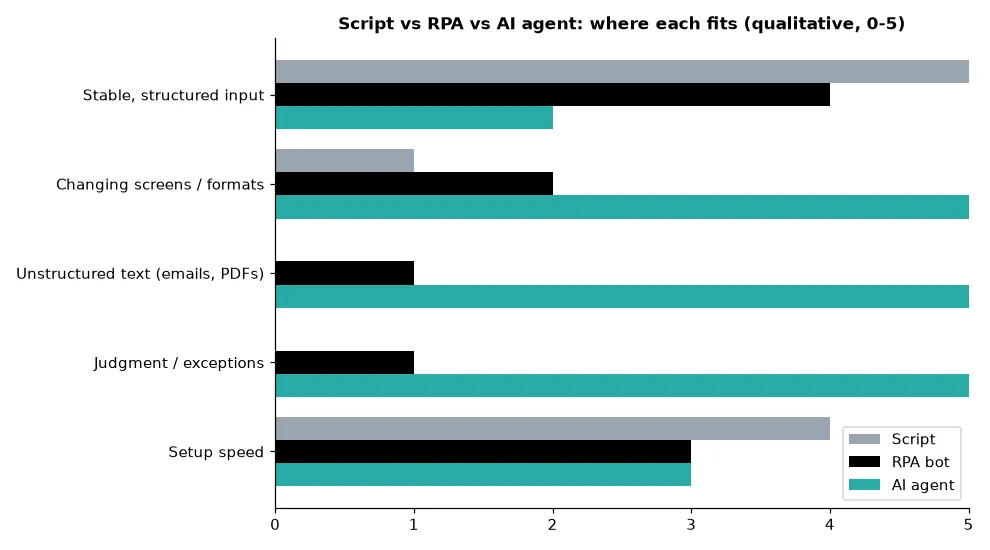
Read the chart as a map of strengths, not a ranking. Scripts win on stable structured input and setup speed. RPA covers legacy screens when no interface for code exists, though changes to those screens create maintenance work. Agents win as soon as text, exceptions or judgment enter the picture. A higher score in one column does not mean that tool is best for every step of a process.
A 4-question decision path
Begin with the shape of the task, then check the system you must use. These questions identify the default tool for a step, not a mandate to automate the entire workflow with one technology.
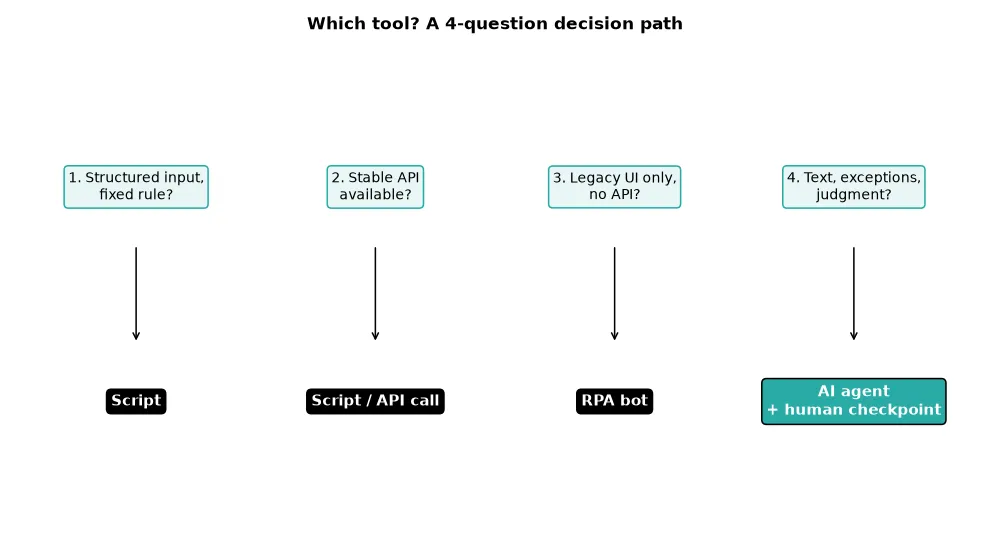
- Is the input structured and the rule fixed? Use a script. Write down the rule and test it against both normal and missing data.
- Is there a stable API? Call it from a script; skip the UI entirely. An API contract is usually easier to monitor than a sequence of clicks.
- Is there only a legacy interface with no API? Use an RPA bot and budget for maintenance. Check whether the screen changes frequently before committing.
- Does the task involve free text, exceptions or judgment? Use an AI agent, with a human checkpoint on anything irreversible. Define what uncertainty looks like and where escalation goes.
Questions can overlap: a customer email may require interpretation, while the resulting database update is deterministic. Split those steps. The agent can classify the request, and a validated script can apply the approved change.
Three concrete examples
Nightly stock export to a spreadsheet: a script
Same columns every day, one rule. Schedule a script to fetch inventory through an API, validate the expected columns and write the export. Alert someone if a column disappears or the row count is implausible. An agent would add cost and unpredictability for nothing. Its ability to reason does not improve a fixed transfer.
Copying order data from a supplier portal with no API: RPA
The screens are stable and the steps are fixed. A bot can sign in, read the order fields and enter them in the target system when integration is not offered. Plan monitoring so a changed screen raises an alert instead of silently failing. Track successful runs, failed fields and time spent on repairs; maintenance is part of the price of this bridge.
Customer emails about refunds, delivery changes or invoices: an agent
Each email is different. The intent must be understood, the right system queried and edge cases sent to a person. This is where Delos Workers operate: they read the message, act in your tools and escalate when unsure. Make the policy explicit: a routine invoice lookup may be automatic; a refund above a threshold needs approval. For a broader view of how to arrange such steps, see our article on agentic AI enterprise workflows.
Combining them is normal
The best setups mix all three. An agent triages and decides, a script performs the deterministic step, and an RPA bot handles the one legacy screen. Treat the agent as the coordinator, not the doer of everything. In the refund example, it can identify the intent and gather context; a script checks eligibility; RPA opens the older finance portal only if that is the sole route to the record. A person approves the actual refund when policy requires it.
Cost, speed and auditability improve when each step uses the cheapest tool that is reliable. Log the handoff between steps, inputs, outputs and exceptions. If a bot fails, the agent should not guess that the order was updated; it should surface the failure for retry or review.
Mistakes to avoid
- Using an agent for a rule that never changes. If the same input always produces the same output, first test a script.
- Using RPA when an API exists. Click automation adds a fragile dependency on the visual interface. Gartner’s RPA glossary describes the UI-driven approach; check for integration options first.
- Skipping human validation on payments, deletions and external emails. Define approval boundaries before rollout.
- Measuring only hours saved. Track error rate and exceptions handled, as well as cycle time.
- Governing nothing. Every automated action should be logged and attributable; see our guide to shadow AI signals and governance.
Quick checklist before you build
- Write the task as a rule: if you can express it completely, script it.
- Check for an API before automating clicks.
- List exceptions and how often they occur; sample real inputs, not just ideal ones.
- Decide the human checkpoint and the owner of failed runs.
- Define one success metric, such as error rate or cycle time, and measure it before and after launch.
Conclusion
The right question is not “agent or RPA?” but “what is the cheapest reliable tool for this step?” Start simple, add judgment only where the work demands it, and keep a human in control when the consequence cannot easily be undone.