AI Incident Response: A 7-Step Playbook for When Your Agent Goes Off the Rails
By Delos team — 2026-11-23
Your AI agent just sent a confidential document to the wrong person. Who cuts access, who tells leadership, who talks to the customer? If the answer is "we'll figure it out", this guide is for you.
Your AI agent just sent a confidential document to the wrong person. Who cuts access, who tells leadership, who talks to the customer? If the answer is "we'll figure it out", this guide is for you.
!Arjun, a security specialist, leads an incident huddle with an engineer in a bright security room

Why AI needs its own incident plan
A classic security incident follows a known pattern: intrusion, malware, leak. An AI incident is blurrier. A model can hallucinate in front of a customer, an agent can run a legitimate action on the wrong data, a hidden instruction in an email can hijack an assistant (prompt injection, the number one risk in the OWASP Top 10 for LLM applications).
The numbers show preparation is lacking. According to the IBM Cost of a Data Breach Report 2025, 13% of organizations reported a breach involving an AI model or application, and 97% of them lacked proper AI access controls. The same report estimates that shadow AI adds about $670,000 to the average breach cost. The global average breach cost stands at $4.44M.
The good news: you do not need an 80-page document. You need a short plan, rehearsed, with a name next to every role.
The 7 steps of AI incident response
!The 7 steps of the AI incident response loop with suggested time targets
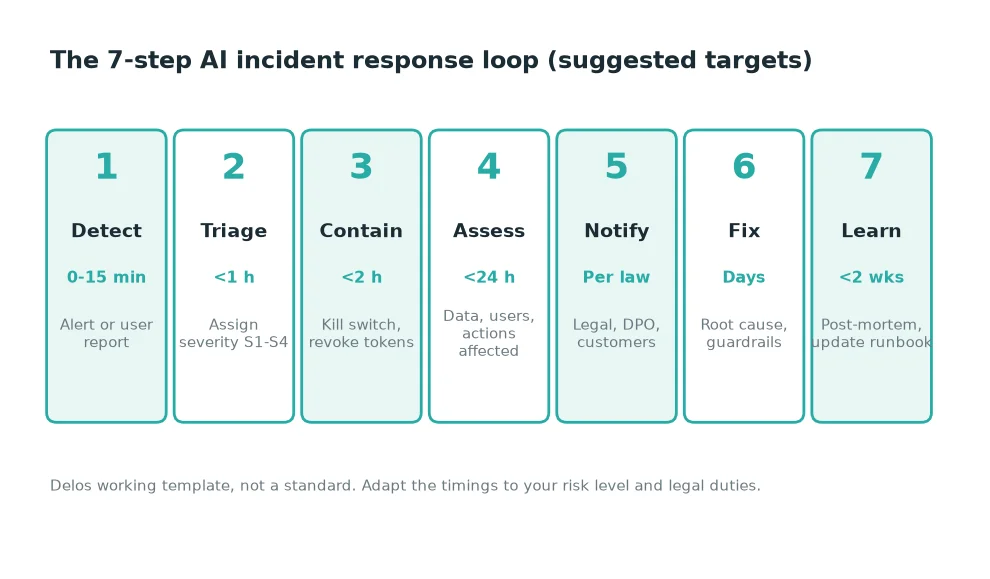
1. Detect (0 to 15 minutes)
An incident arrives through an alert (logs, DLP), a user ("the assistant showed me a document that isn't meant for me") or a third party. Give everyone one reporting channel, no jargon. A vague report beats silence.
2. Triage: severity first
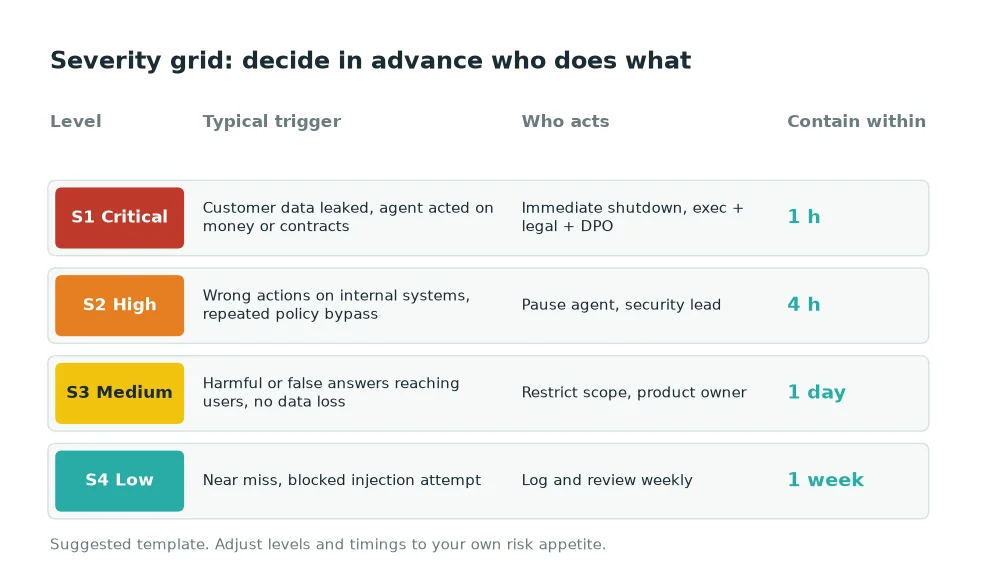
Rate the event on a four-level grid decided in advance. It prevents debates at 6 pm on a Friday.
!Severity grid S1 to S4: trigger, owner, containment deadline
3. Contain
This is the move that matters most. Build a kill switch per agent: a switch that suspends its actions without breaking everything else. Revoke the affected tokens and API keys, remove access to sensitive connectors, switch the agent to read-only. If you cannot stop it within two hours, that is not a technical detail, it is your first project.
4. Assess the impact
Three questions: what data did the agent see, who was it shown to, which actions did it run? Audit logs answer all three, provided they were enabled before the incident. Keep prompts, tool calls and outputs.
5. Notify
Bring in legal and your DPO from level S2. GDPR requires notifying the data protection authority within 72 hours of becoming aware of a personal data breach. The EU AI Act also provides for reporting serious incidents on high-risk systems, with deadlines measured in days: check what applies to your case with your legal team.
6. Fix
Look for the root cause, not the symptom. Over-broad permissions? Unfiltered data source? An overly permissive system prompt? Fix it, then add a testable guardrail: an allow-list of actions, human approval for irreversible operations, filtering of external inputs.
7. Learn
Run a blameless post-mortem within two weeks. Update the runbook, add the scenario to your drills and share what happened with your teams. The NIST AI RMF treats this as a continuous practice (Manage and Govern functions), not a one-off exercise.
A concrete example: the chatty HR assistant
Picture an internal assistant connected to the HR system. An employee asks for a team summary and receives colleagues' salaries, because the connector used a service account with no role filtering. Detection: a message to support. Severity: S2 (personal data exposed internally). Containment: connector suspended in 20 minutes thanks to the kill switch. Fix: the connector now inherits the user's own permissions. This example is illustrative, but the mechanism is real and common.
Five mistakes that cost you
- No owner per agent. Who answers when it goes wrong? See our guide Who's Accountable When Your AI Agent Acts Alone?.
- Logs off by default. You cannot assess impact after the fact.
- No usage rules. A one-page AI acceptable use policy prevents half of the incidents.
- A plan nobody tested. Run one tabletop exercise per quarter; 45 minutes is enough.
- Communicating too late. A short, honest message at hour 4 beats a perfect statement on day 5.
Where to start this week
1. List your agents and assistants in production, with a named owner for each.
2. Check you can suspend any of them in under two hours.
3. Enable and retain audit logs (prompts, tool calls).
4. Adopt the severity grid above and decide who is notified at each level.
5. Schedule a 45-minute drill within 30 days.
With Delos Workers, every agent runs inside a permission and traceability framework defined upfront, which makes steps 3 and 4 much faster. But the tool does not replace the plan: it is practice that makes the difference on the day.