Supplier Delays: 5 Early-Warning Signals Your Team Can Catch 2 Weeks Earlier
By Delos team, 2026-11-25
Spot the signs of a supplier delay while you still have time to act. Start with five signals already in your mailbox, ERP and carrier feeds.

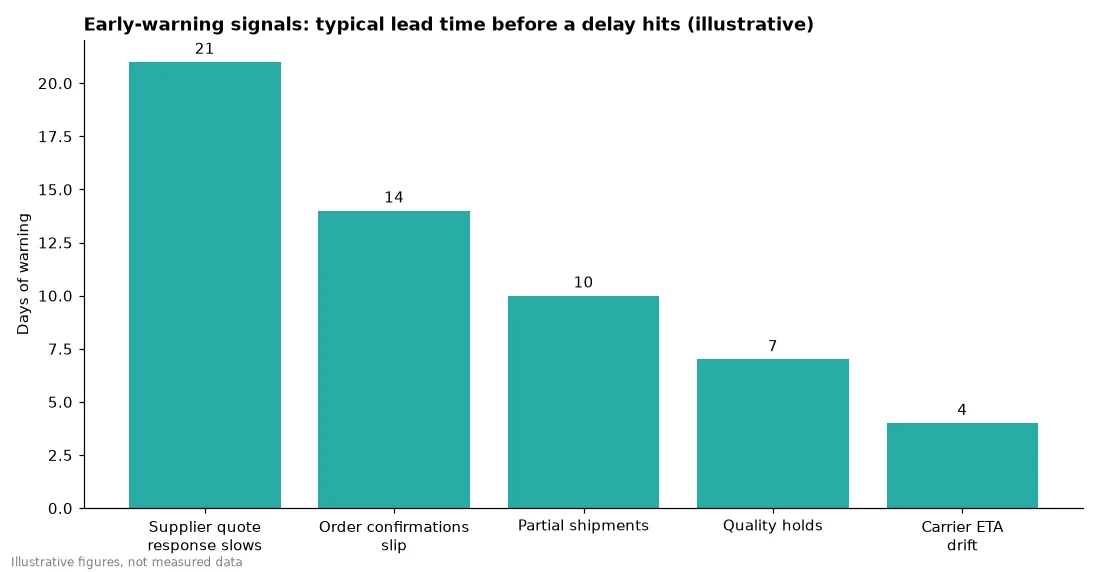
Most supplier delays do not come out of nowhere. By the time a truck is late, the signs have usually been sitting in emails, ERP fields and carrier feeds for days. The problem is not a lack of data. It is that nobody has time to read all of it every day. For some orders, catching a change when it first appears can give buyers two extra weeks to act. That is a planning opportunity, not a guaranteed lead time.
Why delays are spotted too late
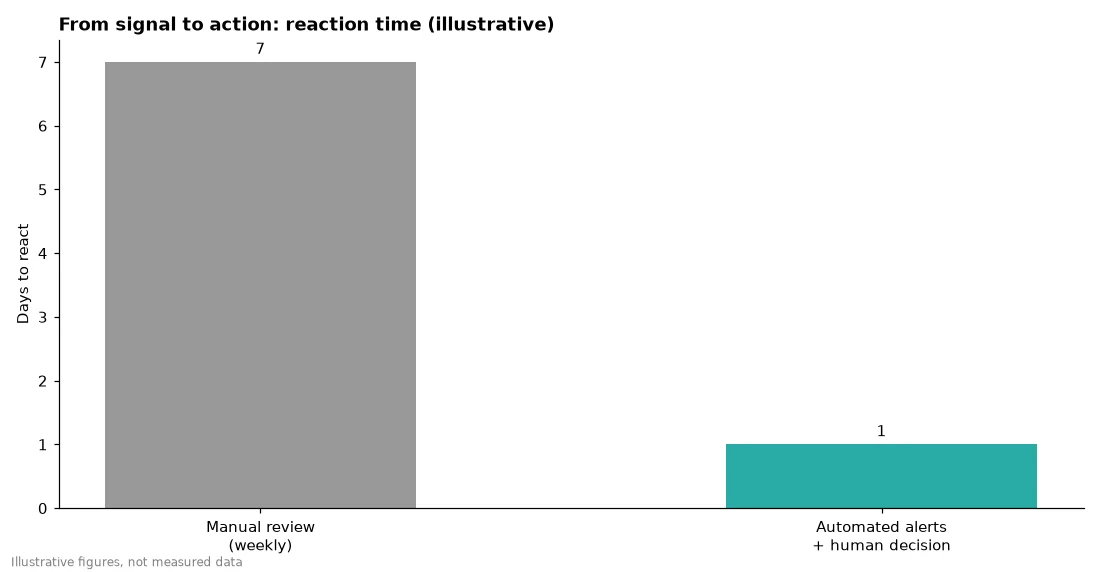
Planners juggle hundreds of open purchase orders. At best, they review the list weekly, starting with what is due this week. An order due in three weeks can quietly slip while everyone is busy chasing today's deliveries. By the time it becomes urgent, expediting freight, finding an alternate source or resequencing production is more expensive and sometimes no longer possible.
Supply chain risk surveys from McKinsey Operations have repeatedly described disruption as a recurring problem rather than an exception. A weekly review is still useful for planning. It just cannot substitute for checking fresh signals between reviews.
The 5 early-warning signals
1. Supplier responses get slower
A supplier who usually answers quotes or order questions within hours starts taking days. That can be the first hint of capacity strain, though a holiday or staff absence can look the same. Compare similar requests and flag the change; do not treat a slow reply as proof that an order will be late.
2. Order confirmations slip or change
Watch both how long it takes to receive a confirmation and what comes back. If a confirmed date moves, or a line comes back marked “to be confirmed,” check that line against the original promise in your ERP. A confirmation that covers nine out of ten items is not enough if the missing item is what keeps production running.
3. Partial shipments appear
A supplier starts splitting quantities that normally ship together. They may be allocating limited stock across customers or waiting on a component. Ask what is holding up the balance and when it will ship. For production, the useful question is whether the first batch covers demand until the rest arrives.
4. Quality holds and rework
More inspection rejects or a hold notice can put the next delivery at risk even while production continues. Check the affected batch, whether replacements are available and when the lot can be released. The shipping date is less informative if the stock is not yet cleared to ship.
5. Carrier ETA drift
A carrier pushes the estimated arrival back a few hours, then does it again. The shifts look small individually but can add up to a day or more. Keep the previous estimates as well as the latest one so you can see the pattern and check whether it threatens a receiving slot or production cutoff.
How to track them without drowning in data
Start with the 20% of suppliers that account for most of your spend or provide parts you cannot easily replace. For each one, establish what normal looks like: typical response time, usual changes to confirmed dates and how often carrier estimates move. Flag deviations rather than every update.
Keep the first thresholds simple: a reply taking more than twice as long as normal, or two ETA changes in 48 hours. Group repeat updates on the same order into one alert. Include the order line, what changed and its source so the buyer can make a call without hunting for context.
Where AI workers help
A Delos worker can read the supplier mailbox, compare confirmed dates with the ERP and scan carrier updates. It can put the deviations into one morning digest with links back to the source. The buyer still decides whether to call the supplier, split the order or use an alternate source. The worker does the reading and cross-checking, not the negotiating.
It is the same principle behind what finance teams automate first: hand off repeatable checks, but keep consequential decisions with the people who own them.
A simple 30-day rollout
- Week 1: Pick 20 critical suppliers and record their baselines. Name the buyer responsible for each one.
- Week 2: Connect the supplier mailbox, ERP exports and carrier tracking. Check that alerts can be matched to the right purchase order line.
- Week 3: Run alerts in shadow mode. Compare them with real delays and record which alerts arrived early, which were noise and which delays were missed.
- Week 4: Tune thresholds, assign an owner and define a playbook for each alert type. Decide when to confirm a date, check inventory or escalate a shortage.
What to avoid
Too many thresholds create alert fatigue. Keep only the alerts a buyer can act on. Never score a supplier on one signal alone, and do not automate supplier communication before buyers trust the alerts. Keep a human in the loop for every commercial decision. For more guidance, see Gartner Supply Chain and ASCM.
Start with two signals
Pick two signals your team can already observe. Measure how many actual delays they flagged, how early those alerts arrived and how many false alarms they produced. Add the remaining signals once you know the first two are useful. Discover Delos Workers or explore more articles on the Delos blog.