AI Saves 40 Minutes a Day. So Where Do Those Minutes Go?
By James — 2026-11-09
Employees say AI saves them 40 to 60 minutes a day. Yet few finance teams can point to the line where it shows up. Here is where the time leaks, and how to capture it.
Ask employees who use AI every day and they will tell you the same thing: it saves time. Ask the CFO where that time shows up in the numbers and the room goes quiet. A saved minute and a recovered minute are two different things. This article looks at what the data says, why the gap exists, and what to do about it.
What the numbers actually say
OpenAI's State of Enterprise AI 2025 report, based on usage data and a survey of 9,000 employees across nearly 100 companies, found that ChatGPT Enterprise users save an average of 40 to 60 minutes per active workday. Data science, engineering and communications staff report up to 80 minutes. Three quarters (75%) say AI improved the speed or quality of their work, and 75% say they can now do tasks they could not do before, such as code review, spreadsheet analysis or building small automations.
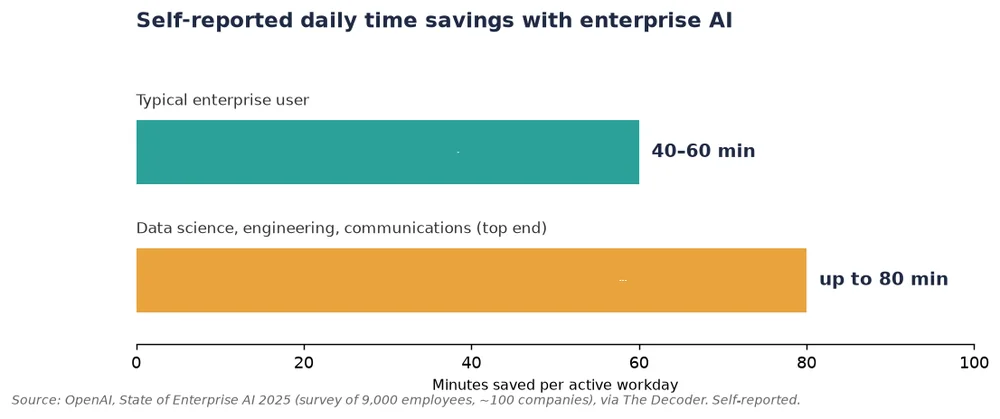
Two caveats matter. First, these figures are self-reported, not measured by a stopwatch. Second, the respondents are all paying customers of the vendor that published the study. Treat them as a credible signal, not as an audited result.
Why a saved minute is not a recovered minute
Time saved on a task only becomes value if something happens to it. Three leaks explain most of the gap.
Leak 1: the time is fragmented
Saving four minutes on ten different tasks gives you forty minutes that nobody can plan around.
Leak 2: the time is reabsorbed
A faster first draft invites more drafts, more meetings, more review rounds.
Leak 3: the bottleneck is elsewhere
In a Quickbase survey reported by No Jitter, 45% of respondents said they spend 11 or more hours a week chasing information from different people and systems, and 58% said they spend more than half their time on work they do not consider meaningful. If that is your reality, faster writing will not fix it: the scattered information is the real problem.
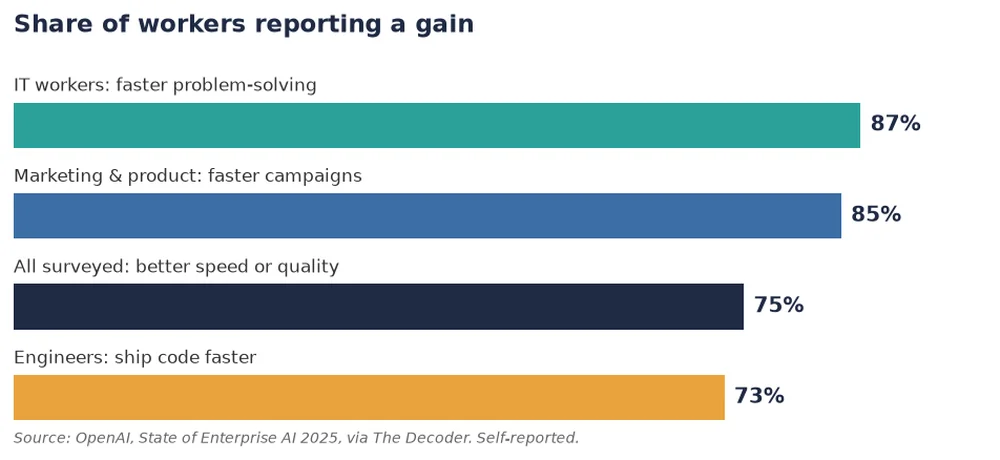
The role breakdown shows where the gains feel strongest: 87% of IT workers report faster problem-solving, 85% of marketing and product teams say they run campaigns faster, and 73% of engineers say they ship code faster.
Breadth beats depth
The most useful finding for a manager is about usage patterns. Workers who apply AI to around seven different types of tasks report five times more time savings than those who stick to four. The gap between users is large: the top 5% of adopters send six times more messages than the median user, and among monthly active users, 19% have never tried data analysis and 14% have never used a reasoning model. The lesson is not 'buy more licences'. It is that value grows with the number of tasks you hand over, which is why the shift from one-off prompts to assistants and agents that own a recurring job matters (see our piece on agentic AI enterprise workflows).
A 5-step playbook to capture the time
- Pick three recurring jobs, not three tools. Inbox triage, meeting follow-ups, weekly reporting: jobs with a clear owner and a clear output.
- Measure the before. Log how long each job takes for two weeks. Without a baseline, any claim of savings is an opinion.
- Hand the whole job to one assistant, not a fragment. A Delos Worker such as James, the general assistant, can own the full loop: sort the mail, prepare the agenda, draft the follow-ups, and flag what needs a human decision. Ownership of the whole job is what turns scattered minutes into a block of freed time.
- Decide in advance where the time goes. Reinvest it explicitly: more client calls, a backlog cleared, a process reviewed. If you do not decide, the calendar will.
- Review monthly and keep the governance in place. Check quality, data access and compliance as you scale; our AI Act self-test is a good starting point for that conversation.
A simple way to read your own results
Compare three numbers per job: time before, time after, and time reinvested. If the first two move but the third stays empty, you have a nice tool and no business case. If all three move, you have a use case you can defend to finance.
Frequently asked questions
How much time does AI really save employees?
In OpenAI's 2025 enterprise survey, users reported 40 to 60 minutes per active workday on average, up to 80 for data, engineering and communications roles. These are self-reported figures.
Why don't time savings show up in company results?
Because saved minutes are fragmented, reabsorbed by extra work, or blocked by a bottleneck elsewhere, such as scattered information.
What is the fastest way to capture the gain?
Give an assistant ownership of a full recurring job, measure the baseline first, and decide where the freed time is reinvested.
Conclusion
The question is not whether AI saves time. Employees have answered that. The question is whether your organisation has decided what that time is for. Start with three recurring jobs, measure them, and let the numbers decide where to go next.
Sources: The Decoder: OpenAI claims generative AI saves knowledge workers 40 to 80 minutes a day; No Jitter: How Much Can AI Improve Productivity?.